Tuesday, February 7, 2012

D800 / D800E announced!

It's finally here after a long wait!
I won't go into the details of the camera since it's all over the internet.


Product Tour on YouTube:

Joy Ride Promo Video:

I've just gone thru the joy ride video. MY GOD! It's amazing! Take note of all the low light scenes and the details. The reflections on the helmet as he cruises thru the night. The details on the sunrise scene... All I can say is: WOW!

For those who are wondering, The difference between the 2 versions is simple: The D800E does not have an Anti-Aliasing Filter (AA Filter). What this filter does is remove moiré effects.

Don't understand what that means? Read this!

Friday, February 3, 2012

Get a Grip!

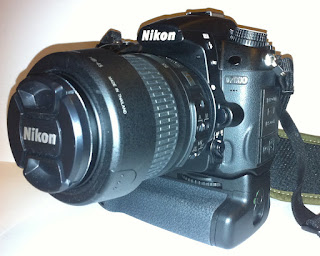
I bought a battery grip! 3rd party, as the original MB-D11 is priced too high locally. Nikon SG has a recommended retail price (RRP) of S$334! I wouldn't pay this amount for a grip that does nothing more than hold extra batteries and allows you to hold the camera in portrait orientation. Yes, it is tough and weather sealed. So?

Seriously, this thing only acts as a grip. Unless it adds GPS functionality or increases the performance of the camera (FPS), I don't see a point spending so much money on it. It simply doesn't justify the hefty price tag. I can get a fairly good compact camera or a good tripod with this amount!

Back to the post. My intention is to introduce the grip that I bought. It's made by Hercules Accessories, distributed locally by SGCameraStore. Usually priced at S$120, I got it during the CNY (Chinese New Year) sale at a price of S$68! Yes, it's S$68.00!

There are quite a number of 3rd party grips in the market, so what made me choose the Hercules?
1) Price --> The CNY offer was simply irresistible!
2) Dials directions --> It's been reported that 3rd party grips are all dialing in the opposite direction. However, thru a fellow forumer, it is reported that the Hercules grip does not have this issue, thus I took the plunge! This is the actual reason I bought the grip.

Note: I bought this grip on 19th Jan 2012, but didn't have time to test/play with it til the 28th. While field testing, I found some issues with the grip. On the 30th, SGCameraStore did a 1 to 1 exchange for the faulty unit I had. Read on as I review the grips --> GripS as the 2 I had my hands on were slightly different.

First impressions: Build quality of the grip is good. It does not feel like cheap plastic. Instead, it feels really solid. The rubbery area feels slightly different from the camera, but it's not cheap rubber either. The lock nut does not move freely after you attach the grip to the camera, unlike the fake Nikon MB-D11's which had the lock nut running wild even after the grip was attached.

From the looks of the logo, I kind of  expected their packaging to be something like Nikon's, but hey, surprise! It wasn't what I was expecting!
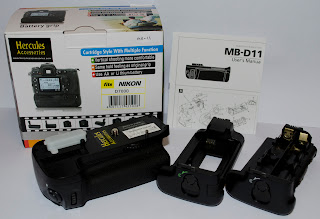
The Box and Contents (V1)
As of the time of posting, Hercules website is longer available. I do remember it used to be there. I wonder what happened?

So, what was the issue I mentioned earlier? I believe it's either a bad connector or the circuit board was faulty. The grip was able to function properly initially when connected to my camera. I could check battery info, turn the dials, and all buttons responded properly. However, I noted that the front dial was turning in the reverse direction! The main dial was working alright.

I didn't notice the failure only until halfway thru my outing. I was happily shooting away until I had time to rest and wanted to check the battery info. It was then that I realized the grip was not functioning properly. The camera couldn't sense the battery in the grip. I tried removing and re-attaching the grip, making sure the connector was in place, and that nothing was in the way but that did not help at all. The shutter button kept responding so I thought it might be a battery compartment issue. However, after further testing, I realized the dials were not responding too. It was already past the 3 days one to one exchange period so I was rather horrified! There was nothing I can do at the moment in time so I just had to wait.

Luckily, on the 30th, after making an enquiry call to SGCameraStore, I was advised by Melvin (store manager or owner?) to bring the grip and my camera along. They told me they will do a one to one exchange, and that my camera will be used to test the replacement unit they will be giving me. The exchange went smoothly, no further questions asked (after our phone conversation), and I tested the replacement set on the spot. I noticed slight differences in the grips but that will have to wait til I review the new unit.

I had taken pictures of the 1st unit when I got it but did not have time to complete this posting. And with the 2nd unit, I'm now able to make a 'side by side' comparison of the 2 grips. Let's call them V1 and V2 for simplicity's sake. V1 will refer to the faulty unit while V2 will be the unit I am currently holding.

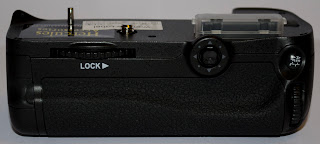
1st difference (cosmetic) - Multi-directional pad's color, rubber grip's texture:
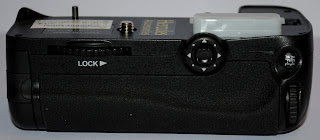
V1
V2

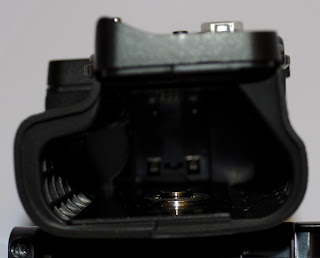
2nd difference (cosmetic) - EN-EL15 Battery Tray:
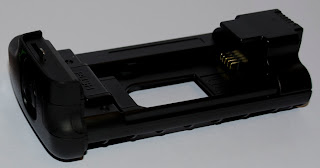
V1 - with 'PUSH' written
V2 - 'PUSH' is missing

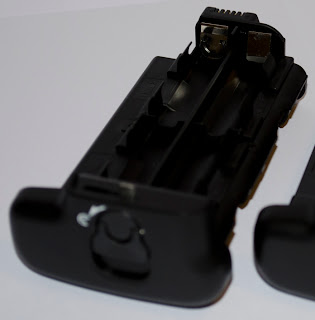
3rd difference - AA Battery Tray Connector material:
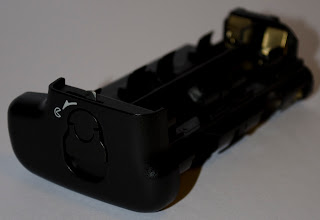
V1 - Copper connectors
V2 - Shiny connectors (I don't know what you call this material)

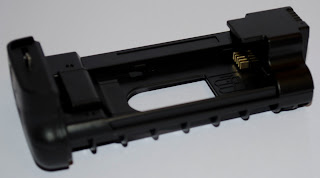
4th difference - metal piece inside the grip has changed:
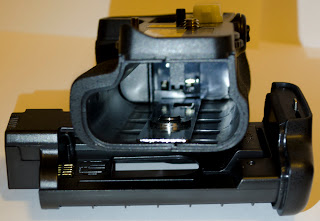
V1 - Slim Metal Base
V2 - Broad Black Metal Base

5th difference: This is the MOST important difference! The front dial is actually working in the correct direction! I believe this is a newer batch of grips from Hercules that has rectified the dials issue. Boy, am I glad that V1 failed! Now with V2, I've got a completely great grip that works just like the original!

And the below pictures shows how the grip looks on the camera. Note: Pictures are taken with an iPhone under poor lighting, thus the IQ is not that great!
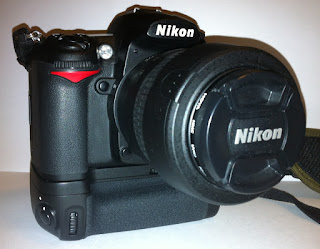
Front view - Right
 
Front View - Left
 
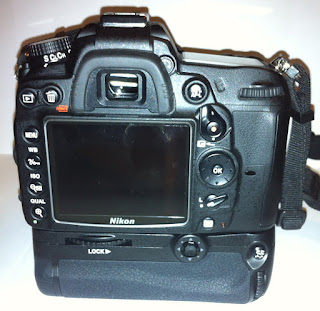
Back

I hope you've enjoyed this introduction + review of the grip like I did posting it.

I'm in love with the grip. The camera feels so much better with it on! I won't be leaving home without it anytime now!

Monday, January 30, 2012

Adobe Camera Raw 6.6 Released!

Adobe Camera Raw 6.6 for CS5 and above released!
Support added for the below cameras:
  • Canon Powershot S100
  • Fuji Finepix X10
  • Leica V-LUX 3
  • Nikon 1 J1
  • Nikon 1 V1
  • Panasonic DMC-GX1
  • Ricoh GR Digital IV
  • Samsung NX5
  • Samsung NX200
  • Sony NEX-7
Here's the link to the official site.

Wednesday, January 25, 2012

Profile picture updated

All thanks to my shooting buddy Fiona Tay for shooting this picture of me while we were at Chinatown shooting the CNY stuff!

She was using a Canon 5D Mark II with a 50mm prime.

Tuesday, November 15, 2011

My take on firmware updates

There are folks out there who are not fans of firmware updates. Their believes: "If it ain't broke, don't fix it."
This believe belongs to the computer technicians in the 80's or 90's. It applies mainly to the firmwares for servers. Sometimes a new firmware does not help with the problem, it instead introduces new problems or cause the whole system to crash.

How or why does this happen? In my perspective, I'll relate the cause to the operating system's (OS) capabilities. They were not as robust as they currently are, thus any significant changes to how the motherboard addresses it's I/O (input output commands) may cause the OS to panic and thus crash. Modern systems should no longer experience this problem, since they are written to support multiple hardware off the shelves, hot swapping etc.

I'm an advocate of firmware updates. If there's a new release, I'll update. Why? Because the updates are there to fix problems, not create them (well, they may in rare cases, but these are normally fixed pretty quickly).

Firmware updates includes fixes as well as new features or enhancements to existing features, so, why not?
Firmware upgrades not only applies to cameras. They apply to a lot of other things like your computer: the motherboard, video card etc etc... Even your mobile phone needs an update from time to time!

For those who are afraid of updating firmware, we are now living in the 21st century. Firmware updates are really reliable and easy to perform. It's not like back when updates may fail halfway. The updates nowadays are very well written. If it fails, it will reverse to the previous working version. It's so advanced that all you need to do is connect up your device, run the update, and off it goes! 'Fully' automated!

Like I said, I'm an advocate of firmware updates. I update all the computers that comes to my desk, and I also update the servers that require any maintenance. If you are still worried, then do this: wait a month after the latest firmware has been released. Google around to see if anyone complains about the latest firmware. If there's no major complains about the firmware, I'll bet the firmware is good and you are safe to update.

Enough of my ranting already. Time to go do some updates!

Sunday, November 13, 2011

Some important updates

Seems like I'm turning this into a monthly (or more) blog.
Family life has been top priority for the past months. Been spending more time with my daughter after she went back to school. OK, let's get things going.

Important updates you should know of!

1) Firmware updates (v1.01 & v1.03) for Nikon D5100 and D7000. For those who have been plagued by the memory card problems (mostly Sandisk cards), Nikon has finally released an update to resolve the issue. Note: Whether it resolves or not, I'm not sure. I don't own the D5100 and I don't have this problem on my D7000.

2) ViewNX 2 updated to version 2.2.3
This is the basic software that comes with your DSLR to view and edit your photos. For home users who are not using other advanced software, please update your version for the bug fixes. (I realized mine was version 2.0.2!!!)

3) Updated NEF codec support (v1.12.0).
Thanks to the Nikon 1 series cameras, NEF got updated again. This time, it works for D7000 NEF files as well! What this does is: it enables your windows explorer to view NEF files directly. If you do not have this installed, the pictures you have taken will only appear as the NEF icon in thumbnail view. With this codec, windows explorer will display your pictures like JPEGs. Advantages: You can finally sort / delete your NEF files directly from windows explorer. I'm gonna do some housekeeping after this to remove all the random shots I took (NEF files are huge and take up tons of space!).

Sunday, September 18, 2011

Flickr Account

I've got a Flickr account! If you're interested in my photos, please take a look here.

An upgrade!

I've been pretty lazy in updating my blog. My sincere apologies to those who are looking out for more information here.

I've done quite a bit of work on improving my skills -- shooting more and more really does help you gain the confidence and knowledge you require to take great shots with a DSLR. You get to know your camera more and you also improve on your skills as you start getting familiar with your camera's functions.

I was at IKEA recently with my family shopping for a new cupboard and I chanced upon a LED light strip for bookshelves. I  bought one of it immediately 'cos it's simply too cheap!

Back home, the 'upgrading' project started. It was pretty simple.
I just had to find the right spot to place this light strip.

So, what is this upgrade about actually?

Well, I added the light strip to my dry cabinet!
Below are the before and after effects (pictures taken using a Canon Ixus 860IS):

After lights were on
Before lights were on
For a $3.90 investment, I say it's pretty worth it!
And this is how the actual strip looks:

Top View with the holder (screws on to shelves)
Lights up by pressing the button on the left.

Back of the strip. Powered by 2 x AAA
How I mounted the strip: Simply use double sided foam tape to stick the holder on to the top part of my dry cabinet. But before I did that, I felt around the cabinet for any slots that I can use and realized that there was actually a nudge around the top. That was the perfect location to stick the holder!

NOTE: Do be careful if you are going to feel around your cabinet. I cannot guarantee there are no sharp edges within the cabinet! Mine had none, and the edges were actually rounded to prevent any accidents! Kudos to Digi-Cabi!


Sunday, September 4, 2011

Straps!

I've changed my strap after having some strains using the Nikon one that came with the camera. It's a sturdy strap, but it's also hard on the neck.

After reading thru the forums, I short listed the Crumpler Industry Disgrace and Op/Tech Pro Strap. The Black Rapid RS-7 is a highly recommended strap, but I can't put myself to spending $90+ on a strap. I'd rather use the money to buy a macro attachment.

The Op/Tech Pro Strap (black) can be gotten for around $20 SGD, while the Industry Disgrace goes for $33. I ended up choosing the latter, as it felt more comfortable on my neck.

I bought this strap on 2nd Sep 2011 and til date, it has served me well. I no longer feel the strain of the camera's weight on my neck and I've been happily lugging the camera on my neck whenever out with my family.

When I bought the strap, there were some confusion as online pictures all showed the strap with a round rubber Crumpler logo. The one I got is a cloth rectangle logo sewn onto the strap. I clarified this with the Crumpler staff and was told the newer batches came with the 'new' logo.

I bought the strap at Crumpler's branch in Raffles City. The guy who served us was really friendly and Kudos to Crumpler's attention to customer satisfaction! I had to go thru a few straps to get one that I was finally happy with. Some of those straps had threads that were not ended properly and might not survive a camera's weight. According to the staff, those straps will be rejected back to factory and their production lines rechecked.

I really appreciate this level of service. It gives you confidence in them, that they are proud of their products and they want the best for YOU, their customer. Well done, Crumpler!

Note: I took some pictures but decided against posting them since the official website has already got detailed pictures on it.

Note 2: I noticed quite a few folks using this strap while moving around. And I noticed that quite a number of them have the strap reversed. Look at picture 4 from the official website to see how this strap should be worn (black curved portion should be up, supporting the neck). One other way to spot it is that the Crumpler logo should be on the left, not the right side when you wear it.

Sunday, July 17, 2011

How to choose my first DSLR (Part 2)?

A continuation from Part 1 ...

Now for Group 2 users, things gets complicated.
Let's introduce the concept of the "System". Photography gear makes up a system. The system you choose ultimately determines the type of gear you will purchase. This point is often overlooked by new DSLR users because they are new! They do not know about the system at all!

Why is the system important? Why should I waste so much time researching / deciding on the system?
The answer is simple: You do not want to waste precious dollars and time in the future. A photographer usually sticks to one system as the lenses and accessories are interchangable / re-usable when (s)he upgrades the camera body in future. (S)he won't have to go thru this hassle of evaluating everything again. Being very familiar with the gear (s)he already possess, (s)he can work with the new camera easily. Depending on what (s)he has bought, the 'spare' camera can become the backup camera in any situation.

So, what makes up the "System"?
1) Camera body
2) Lenses
3) Accessories such as flash / remotes etc, including 3rd parties
4) Technical support after purchase
Note: The above does not denote the order of importance!

When choosing a DSLR, lenses and accessories forms part of your decision. You have to learn about the lenses and accessories available before you make a final decision on which body to get. A body may give you all the bells and whistles that you are looking for, but if the lenses / accessories are not easily available in your region, or if you are not able to get good support when technical issues arise, that's it. You will start to be frustrated by the system itself. Imagine the turnaround time just to get your lens or body repaired / serviced. This time is equivalent to the time you are not able to use your gear. Can you make do with say, a month without your gear?

To illustrate further, let's take my decision making process as an example.
Bear in mind that I was a newbie with DSLRs when I was going thru this process.
When I was about to purchase my first DSLR, I short listed the below cameras:
1) Canon 60D
2) Nikon D7000
3) Pentax K5

3 different brands, 3 different systems. The costs for the standard kits are generally similar.
I went to shops/IT shows to feel the cameras (didn't manage to try the Pentax though) on display. The Canon 60D didn't feel really right in my hands (the 550D felt way better). It just didn't fit my fingers and I found that holding it for a short while makes me uncomfortable.

So it was down to the D7000 and the K5. Reading reviews and all, the K5 is an outstanding camera! I really wanted to get my hands on it. BUT! the decision fell thru after I evaluated the other components of the Pentax system. Lens offering from the Pentax line is OK. The major concern is the support available. In Singapore, there is only 1 shop that is also the distributor and "service center" for Pentax. If you need any servicing, you send it back to the shop. Online feedback has shown that the shop/distributor is doing a great job servicing Pentax customers. But, being the one and only shop in Singapore is enough to make me take a step back and give it some serious thoughts.

The next thing that came into the picture was the flashgun. I wanted to get a flashgun together with the DSLR as I knew I won't invest a few hundred bucks for a flashgun anywhere in the near future, so I might just as well buy the whole system at once. This contributed to my decision to get the D7000 over the K5. When sourcing for the Pentax flashgun, I realized that there wasn't much to choose from. Comparing the flashguns available from the makers and 3rd parties, Nikon has way more choices. With the same budget, I can get a better flashgun for Nikon compared to the Pentax.

And lastly, before I finally took the plunge, I 'looked into the future'. I asked myself where I will be with the camera in 3 to 5 years time? What will I be doing with it? Does this particular system I have chosen satisfy my future needs (new lenses/accessories)? Will I be able to setup a shooting studio easily with this system? Will the system be useful for shooting events? (Nikon's Creative Lighting System "CLS" comes into mind.) These questions may seem "too professional" for a newbie, but hey, if you are serious about photography, this should form part of your decision/dream making!

If you have read all the way here, I thank you. I believe you will have a better understanding and clearer picture on how to make that decision now. I wish you success in the system that you will be choosing! =)

PS: My apologies to all who were waiting for this posting. I just didn't have the time to complete it. But thank you all who were patient and waited for it!